
Export transfers to CountX
Preview the fixed workbook, handle blocked lines, and download the complete export.
On this page
The transfer export uses the current transfer filters and all matching pages. Its default CountX warehouse transfers template produces a fixed 14-column XLSX workbook with a legend and excludes Amazon transfer rows by default. Keep that original layout when you need the CountX import format; changing columns creates a custom workbook.
Prepare the scope
- Open Internal inventory transfers and select the period, provider, source account, and route filters you need.
- Review the Export-ready lines and Lines to review counts. Open blocked lines to read their specific missing-data messages.
- If the same transfer appears in several sources, select the source you will use as authoritative. The export preview warns when its scope includes multiple resolved sources.
- Select Export to CountX.
Read the preview
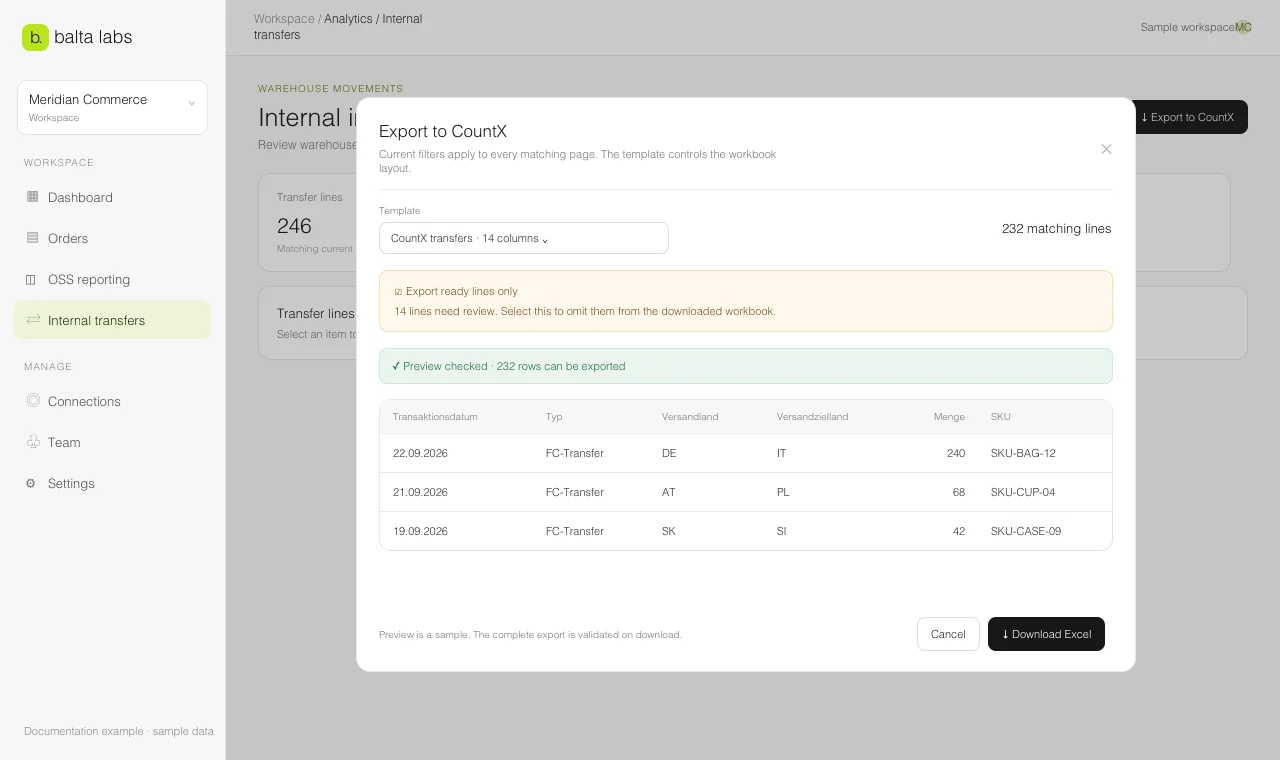
Choose the template in the export dialog and inspect the preview, row count, and validation messages. The preview may show a sample; the complete file is validated when you download it.
When blocked lines exist, the dialog offers Export ready lines only. Selecting it explicitly omits the lines that need review. If you leave it off, incomplete lines are included and CountX may reject them. Read the warning and check the displayed line count after changing this option.
Select Download Excel after the preview reflects the intended source and filters. The file contains all matching pages, not only the rows visible in the table. Keep a record of the period and source selection used for a CountX submission.