
Reconcile orders across sources
Understand linked order records, authoritative amounts, and duplicate matching rules.
On this page
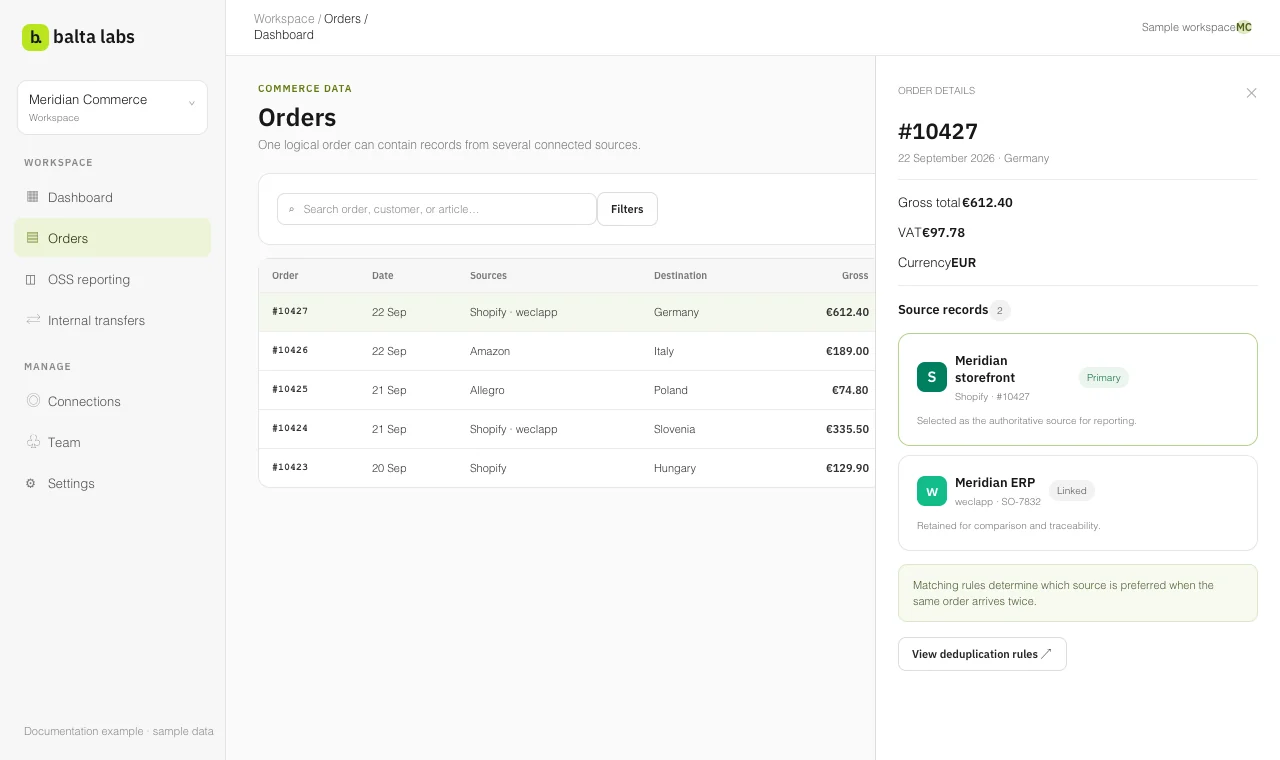
One sale can appear in more than one connected system. For example, a marketplace may record the customer order while an ERP records its fulfillment. Balta Labs links matching source records to a single order so that authoritative order views can count the sale once. Original source events remain available for investigation.
Read how duplicate matching works for the principles, then create and manage a deduplication rule for the exact steps.
Inspect an order
- Open Orders → Dashboard. Choose a period and, if needed, filter by source, country, or currency.
- Search an order number and open the row.
- In Order details, compare the linked Source records. The primary badge identifies the selected record used for the canonical order view.
- Review gross, net, tax, status, and any capability gaps. A missing amount or field is not necessarily a value of zero.
Amazon orders can wait for financial data after the order itself arrives. Balta Labs marks those records as awaiting pricing. Review them again after the financial import completes.
Review matching rules
Open Orders → Configuration → Dedupe to see the active rules. A rule defines which source records should be matched and what action to take. Before activating or changing a rule, use its preview to inspect examples and counts. The preview does not change the underlying orders. Active rules are applied automatically as successful order fetches cover new dates. A manual scan of recent stored orders is available when you need to recheck them.
Keep a rule specific to the identifiers and accounts it is intended to match. Review its matched orders after activation. If two unrelated orders are linked, or one sale remains split, revise the rule and recheck the results before using the related totals.
Choose the right export view
The OSS Tax summary and Individual orders bases use the selected authoritative record for each matched order. All source events includes each original sale or refund event and can contain duplicates. Compare sources is useful for identifying amount differences between matched records. Do not sum the original source-event view as though it were a deduplicated sales total.