
Connect Shopify
Add a Shopify store with its domain, client ID, and client secret.
On this page
Use a Shopify connection to import store orders, refunds, payments, and fulfillment details. Supported Shopify transfer records can also appear in Internal inventory transfers.
Before you begin
Have the store’s *.myshopify.com domain, client ID, and client secret ready. For a Dev Dashboard app, Shopify’s credential guide directs you to Dev Dashboard → Apps → your app → Settings → Credentials to copy the client ID and secret. Confirm that the app has the access needed for the records you plan to import. Other Shopify app types can have a different credential flow.
Add the store
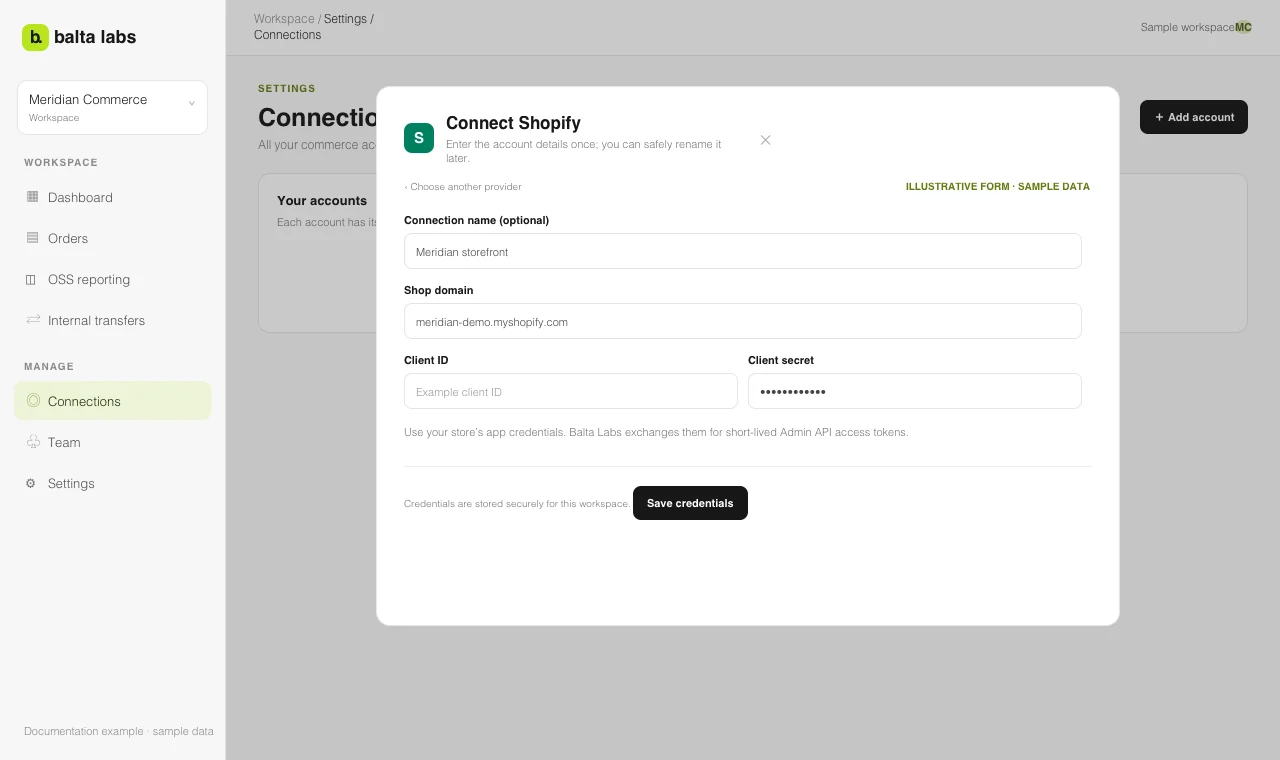
- Open Settings → Connections → Add account → Shopify in Balta Labs.
- Enter a Connection name if this workspace has several stores. Otherwise, the store domain is used as its label.
- Enter the Shop domain, for example
example.myshopify.com. - Enter the Client ID and Client secret for that store.
- Select Save credentials.
- On the connection card, select Test. Then open Orders → Configuration → Sources and start the first import.
Keep each Shopify store as a separate connection. This lets you select one store or all stores when reviewing OSS data and helps identify the source of an order.
If data is missing
Check the store domain and credentials with Manage, then run Test again. In Orders → Configuration → Sources, check the latest import job and coverage. An imported order may have different fields from another platform; inspect the order’s source records before treating a missing field as a zero value.