
Review an OSS report
Check source coverage, classification, and the orders behind each total.
On this page
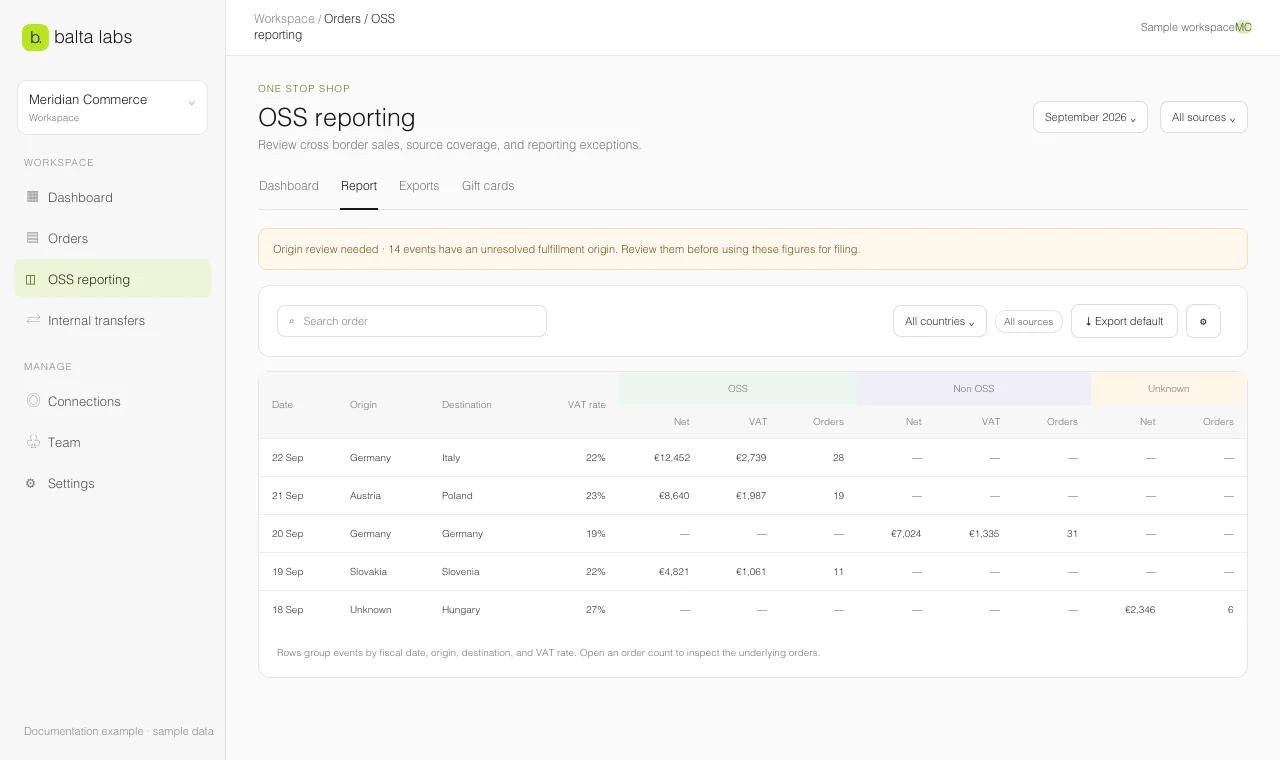
Use the OSS report to find which orders contribute to a total and which records still need review. A displayed amount is only as complete as the imports and fields available for the selected period.
Set the scope
- Open Orders → OSS → Report.
- Choose the date range. Confirm the displayed source: All sources or one connected account.
- Check the currency selection before comparing amounts. A source filter or currency change can change the totals you see.
- Review Orders → Configuration → Sources if an import is still running, failed, or does not cover the full period.
Read the classifications
OSS contains events classified within the OSS scope. Non-OSS contains events classified outside it. Unknown signals that Balta Labs cannot classify an event reliably from the available data. Do not add unknown amounts to another category by assumption.
The report groups amounts by reporting dimensions, including the shipping route, date, VAT rate, and currency. Select an order count in a report row to inspect its orders. Search an order number or filter a country to narrow the view. In the order list, open a record to see its source records and any capability gaps.
Resolve review items
- If the report says Orders need origin review, open Setup and warehouse origins.
- If an order appears in multiple systems, review matching and authoritative sources.
- If a source has missing tax or fulfillment fields, inspect the original record and the source status. Platform support varies by field.
- If the period has no data, check the connection and the first import in Sources.
When the scope and review items are understood, use Export default for the workspace default file or open Export Studio to choose a specific layout.