
Connect Amazon
Add an Amazon seller account and select the marketplaces to import.
On this page
An Amazon connection imports seller orders, financial transactions, and FBA shipment data. You choose the marketplaces that belong to the connection. Marketplace coverage matters when comparing sales across countries and when reviewing OSS origin data.
Before you begin
Have the Selling Partner API Login with Amazon (LWA) client ID, client secret, refresh token, and seller ID for the seller account ready. Amazon’s SP-API connection guide explains that the client ID and secret come from the registered application and the refresh token comes from seller authorization. Check whether your application is public or private before following Amazon’s authorization steps.
Add the seller account
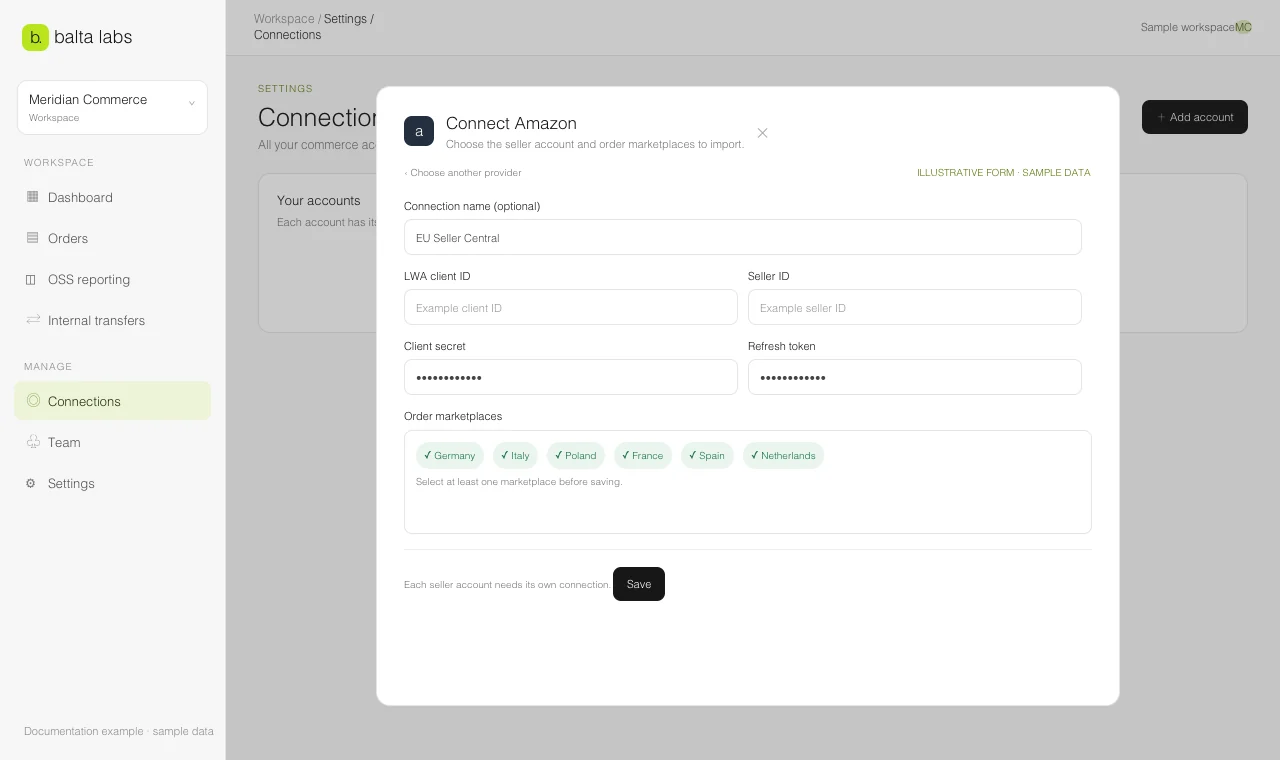
- Open Settings → Connections → Add account → Amazon in Balta Labs.
- Enter an optional Connection name. Without one, the seller ID becomes the account label.
- Enter the LWA client ID, Seller ID, Client secret, and Refresh token.
- Under Order marketplaces, select the marketplaces you want this connection to cover. At least one must be selected.
- Save the connection and select Test on its card.
- Open Orders → Configuration → Sources. Start an import and check coverage for each selected marketplace.
Use a separate connection for a separate seller account. If you later change the selected marketplaces, save the connection and review the source coverage again.
What to expect during import
An Amazon order can appear before its final financial amount is available. Balta Labs shows an awaiting-pricing state instead of treating that missing amount as a sale of zero. Financial and order streams may complete at different times. Use the source status and order details to decide whether a record is ready for review.
For internal transfers, Amazon ledger history is limited to the range Amazon makes available, and today’s movements can appear after the day closes. Review the transfer source status before assuming that a recent movement is missing.